The system allows you to associate PTZ functions with the joystick buttons. Here you can define the buttons that will perform zoom, focus, camera switching, among others.
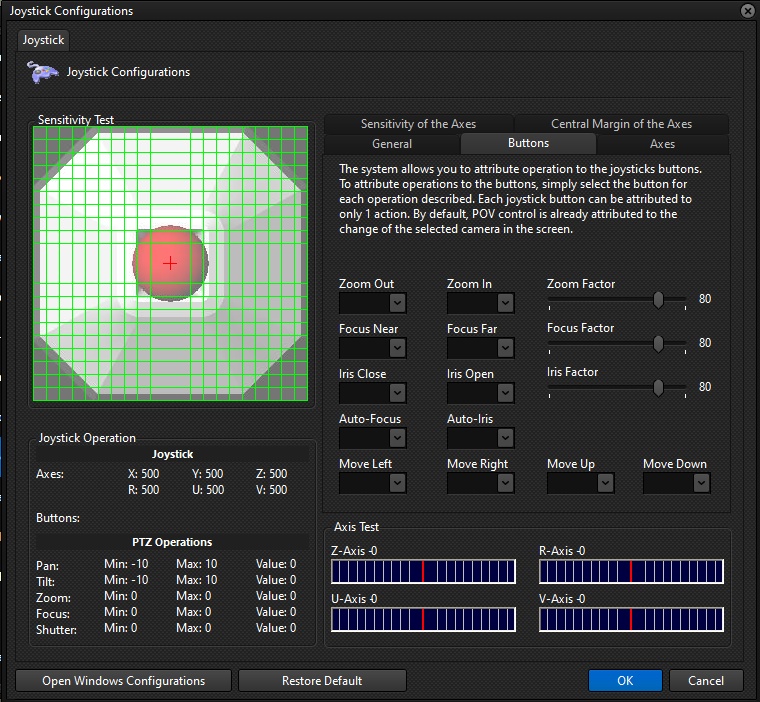
•Zoom out: Select the joystick button that will perform the zoom-out function.
•Zoom in: Select the joystick button that will perform the zoom in function.
•Zoom factor: Select an operation factor, in percentage. This factor applies to zoom speed. In the example above, the camera will zoom at 80% of its maximum speed when the button is pressed.
•Near focus: Select the button that will perform the near focus adjustment function.
•Far focus: Select the button that will perform the far focus adjustment function.
•Focus factor: Select an operating factor, in percentage. This factor applies to the focus adjustment speed. In the example above, the camera will adjust its focus at 80% of its maximum speed when the button is pressed.
•Close iris: Select the button that will perform the iris closing function.
•Open iris: Select the button that will perform the iris opening function.
•Iris factor: Select an operation factor, in percentage. This factor applies to the iris adjustment speed. In the example above, the camera will adjust its iris at 80% of its maximum speed when the button is pressed.
•Activate auto focus: Select the button that will perform the auto focus function.
•Activate auto iris: Select the button that will perform the auto iris function.
•Move left: Select the button that will perform the camera selection switching function. This button selects the closest camera to the left of the selected camera.
•Move right: Select the button that will perform the camera selection change function. This button selects the closest camera to the right of the selected camera.
•Move up: Select the button that will perform the camera selection change function. This button selects the closest camera over the selected camera.
•Move down: Select the button that will perform the camera selection change function. This button selects the closest camera below the selected camera.